
How to Find Authorized Wholesale Suppliers for Amazon FBA in the USA: A Step-by-Step Guide

Sell Faster
✔ Quick Answer
Gather your business documents first, then pick your category and budget, source leads from brands, trade shows, and referrals, verify every supplier’s authorization yourself, check Amazon eligibility before ordering, and always start with a small test order.
The 8 Steps at a Glance
| Steps | What You Do | Main Output | Risk If Skipped |
|---|---|---|---|
| 1. Prepare documents first | Gather business registration, EIN, resale certificate where required | An application-ready folder | Rejected or delayed applications |
| 2. Define criteria | Choose categories, budget, margin target, and MOQ limit | A short list of target brands | Chasing suppliers with no clear goal |
| 3. Find suppliers | Use brand sites, directories, trade shows, referrals | A list of leads | Relying on unverified listings |
| 4. Contact and apply | Send a professional inquiry and open an account | Pricing and account terms | Generic emails that get ignored |
| 5. Verify authorization | Confirm identity, address, and brand relationship | A verified or rejected supplier | Buying from an unauthorized source |
| 6. Evaluate the supplier | Compare MOQ, pricing, shipping, payment, returns | A supplier scorecard | Choosing on lowest price alone |
| 7. Check eligibility & profit | Test the ASIN in Seller Central and run the fee maths | A go or no-go decision | Stuck inventory or thin margins |
| 8. Test order and review | Place a small order and inspect the invoice | A proven supplier relationship | Oversized first orders & weak paperwork |
Step 1: Prepare Your Business Documents
- Business registration documents (e.g. Articles of Organization).
- An Employer Identification Number (EIN) or other official tax identification details.
- A resale certificate or seller’s permit, where required by your state.
- Your physical business address and direct commercial contact information.
- Amazon Seller Central account details, if requested by the distributor.
✔ Pros of Preparing First
- Applications move significantly faster, and distributors immediately treat you as a serious commercial buyer.
❌ Cons of Preparing First
- It takes upfront setup time, and some paperwork (such as state sales tax permits) may take several weeks to process.
Step 2: Choose Your Product Category and Sourcing Criteria
Before you search for suppliers, decide what you want to sell. Beauty, Grocery, Home & Kitchen, Toys, and Pet Supplies all work differently in terms of competition, fees, and approval requirements.
Decide on these points before you send a single email:
- Demand and competition: Is the product selling steadily, and how many sellers share the listing?
- Target purchase price and margin: What cost leaves you a realistic profit after Amazon fees?
- Budget and MOQ: How much can you spend on a first order, and what minimum order quantity is acceptable? See our guide on how much money you need to start Amazon FBA wholesale.
- Approval needs: Does the brand or category require selling approval in Seller Central?
✔ Pros of Starting with 1-2 Categories
- Your outreach is focused, suppliers take you more seriously, comparing price lists is faster, and you learn category approval rules quickly.
❌ Cons of Starting with 1-2 Categories
- Less diversification if a listing becomes crowded or seasonal, and you may overlook profitable lines outside your shortlist.
Step 3: Search for Wholesale Suppliers Through Reliable Sources
| Source | How to Use It | Pros | Cons |
|---|---|---|---|
| Brand Websites | Look for wholesale inquiry pages, distributor lists, and reseller applications | Closest to source | Some brands do not sell to Amazon sellers |
| Manufacturer Contact | Ask about direct wholesale programs or approved distribution partners | Clear answers on who is authorized | Higher MOQs and slower replies are common |
| Wholesale Directories | Browse by category, location, and specialty (e.g. Wholesale Central) | Fast way to build a long list | Quality varies; all listings need checking |
| Trade Shows | Meet brands and distributors in person, inspect products | Face-to-face trust and product access | Travel cost and significant time commitment |
| Industry Associations & Referrals | Ask established sellers, trade groups, and industry peers | Pre-vetted recommendations | Referrals can be outdated or commercially biased |
| Professional Networks | Reach distributors and brand reps through LinkedIn and trade groups | Direct access to commercial decision makers | Takes patience and follow-up to build rapport |
Step 4: Contact Suppliers and Apply for a Wholesale Account
A message that only says “please send your price list” rarely gets a useful reply. Introduce your business, explain where you sell, name the brands or categories you want, and ask how to open a wholesale account.
Before you commit, know who you are talking to. Amazon wholesale distributors sit between brands and sellers, and the table below compares them with the other supplier types:
| Supplier Type | What They Do | Pros | Cons |
|---|---|---|---|
| Manufacturer or Brand | Produces the product and may sell direct or through partners | Strongest authorization; best chance at lowest cost | High MOQs; strict account approval |
| Authorized Distributor | Receives product through an approved supply relationship and sells to eligible businesses | Verifiable authorization; consistent supply | Pricing sits above brand-direct |
| Wholesaler | Sells in bulk to retailers and resellers | Broad selection; flexible terms | Authorization must be checked brand by brand |
Crucial Questions for Your First Conversation:
- Do you supply products to Amazon FBA sellers?
- Are you authorized to distribute the specific brands I want to buy?
- What documents do you need from me to open an account?
- What are your MOQ, wholesale pricing, and volume tiers?
- Can you provide itemized commercial invoices for completed purchases?
- What are your shipping, returns, shortage, and payment policies?
Step 5: Verify the Supplier's Legitimacy and Authorization
This is the most important step in the process. A polished website or a price list does not prove credibility. Amazon’s supplier-validation guidance recommends reviewing business documentation, checking physical locations, researching credibility, and confirming details through credible sources.
Practical 5-Point Verification Routine:
- Confirm legal registration: Confirm the company's legal name and state registration details through Secretary of State databases.
- Verify physical location: Verify its commercial warehouse or office address via Google Street View and satellite mapping (not a residential address or PO Box).
- Ask for brand relationship proof: Inquire about letters of authorization or official listing on the brand’s authorized distributor portal.
- Contact brand directly: Reach out to the brand's wholesale or corporate sales team to confirm the distributor's current status when needed.
- Review reputation & complaints: Check Trustpilot, BBB, buyer references, and seller forums for delivery or invoice issues.
✔ Pros of Thorough Verification
- Eliminates inauthentic product complaints, account suspensions, and dead capital tied up in unsellable stock.
❌ Cons of Thorough Verification
- Verification takes days rather than minutes, and some brands are slow to confirm distributor status. Build this time into your launch schedule.
Step 6: Evaluate the Supplier, Not Just the Price
The lowest unit price is not always the best deal. Compare each candidate against the same criteria so your decision rests on evidence. The chart below shows one suggested way to weigh a scorecard; adjust it to your own priorities.
| Criterion | What to Check | Warning Sign | Weight | Score (1-5) |
|---|---|---|---|---|
| Authorization Evidence | Brand letter, distributor listing, supply-chain explanation | Claimed relationship cannot be confirmed | 30% | [ / 5 ] |
| Pricing and MOQ | Unit price, volume tiers, minimum order | Price far below market with no explanation | 15% | [ / 5 ] |
| Invoice Quality | Itemized commercial invoice with accurate details | Inconsistent business or product details | 15% | [ / 5 ] |
| Shipping Reliability | Lead times, carrier partners, backorder handling | Vague or shifting delivery promises | 15% | [ / 5 ] |
| Claims & Payment Terms | Damage/shortage claim window, payment options | Refuses written terms or unprotected payment | 10% | [ / 5 ] |
| Communication | Response time, dedicated account rep, clarity | Pressure to buy large amounts before checks | 15% | [ / 5 ] |
Evaluation Rule: One warning sign does not prove fraud, but unresolved inconsistencies should be settled before you send any payment.
Step 7: Check Amazon Eligibility and Profitability Before Ordering
Supplier authorization and Amazon listing approval are two separate checks. Before purchasing, open Seller Central, go to Catalog > Add Products, and search the specific product or ASIN. If a restriction appears, select Show limitations to see what is required. Note whether Amazon brand approval or category approval is needed and whether extra compliance documents are requested. If approval is required, you’ll need to go through Amazon ungating before you can list the product.
Next, run the numbers. Use Amazon’s Revenue Calculator to estimate fees, and include every cost, not just the purchase price:
| Cost Component | What to Check |
|---|---|
| Wholesale Purchase Cost | Per-unit price, minimum order requirements, and volume discounts |
| Amazon Selling Fees | Referral fees (typically 8% to 15%) and closing charges |
| FBA Fulfillment | Weight/size-tier fulfillment fees, monthly storage, and aged inventory surcharges |
| Shipping & Preparation | Inbound freight to prep center/Amazon, barcode labeling, polybagging, inspection |
| Other Operational Costs | Customer returns processing, damaged inventory allowance, return-to-seller costs |
Sample Unit Sale & Profit Breakdown:
| Component | Per Unit (USD) |
|---|---|
| Selling Price (Buy Box) | $24.99 |
| Wholesale Cost | $11.40 |
| Amazon Referral Fee (15%) | $3.75 |
| FBA Fulfillment Fee | $4.50 |
| Inbound Shipping & Prep | $0.60 |
| Estimated Profit | $4.74 |
Estimated Profit: $4.74 per unit (~19% Net Margin, ~41.5% ROI).
✔ Pros of Checking Eligibility First
- You avoid spending working capital on stock your account cannot sell.
❌ Cons of Checking Eligibility First
- Some restrictions only become clear after submitting documents, so initial eligibility is never an absolute guarantee.
Step 8: Place a Small Test Order and Check the Documentation
Once a supplier passes your checks, start with an order that limits your exposure while letting you judge product quality, shipping reliability, and communication.
Before ordering, confirm the supplier can issue a genuine, itemized commercial invoice for the actual transaction. When it arrives, check that it shows the supplier’s details, your business information, the products, quantities, and the transaction date.
Amazon’s Strict Invoice Requirements for Ungating:
- Shows a purchase of at least 10 units: The invoice should reflect a combined purchase of at least 10 units of the product, brand, or category. Invoices with fewer than 10 units are a primary reason for rejection.
- Dated within the last 180 days: The transaction must be completed and recent. Older invoices are typically rejected.
- Matches your Seller Central business details: Your legal entity name and address on the invoice must match your Seller Central account exactly, including punctuation.
- Comes from a real commercial transaction: Must show supplier’s name, phone, address, website, itemized SKU descriptions, quantities, and dates. Order confirmations, packing slips, and retail receipts are not accepted.
What This Means for Your First Order:
- A small test order is not the same as a tiny order: Keep your first order small, but if the product is gated, make sure it reaches at least 10 units so the invoice can support your approval request.
- Check requirements before you buy: Open the listing, select Show limitations, and read what Amazon asks for before placing the order.
- Check the invoice on arrival: Confirm units, dates, supplier details, and your exact business details before submitting. Request a corrected invoice immediately if discrepancies exist.
- Submit promptly: Do not leave the invoice sitting while waiting for shipment to arrive. Submit within the allowed window.
- Keep a copy: Archive the invoice with your permanent purchase records; Amazon may request it during periodic reviews.
Documented Client Journey
From a Fresh Amazon Account to Business Growth
A documented journey of account setup, brand approvals, purchasing, sales performance, and supply chain verification managed by Upsell Ecommerce.
100+
Brand Approvals
$5,000+
3 Mo.
Consecutive Target Met
The client began with a newly created Amazon Seller Account, no brand or product approvals, and no sales history. Through ongoing product selection, purchasing, approval applications, repricing, and account management, the business reached 100+ brand approvals and $5,000+ in monthly sales for three consecutive months.
Phase 1
Starting from Zero: Account Setup & Initial Brand Approvals
1. A Fresh Start – No Brand Approvals: The client partnered with Upsell Ecommerce with a newly created Amazon Seller Account. At onboarding, the account had no brand or product approvals and no sales history.
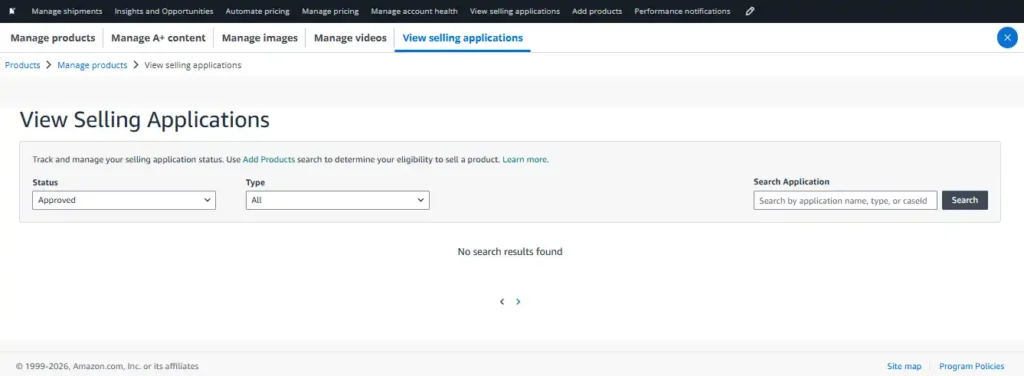
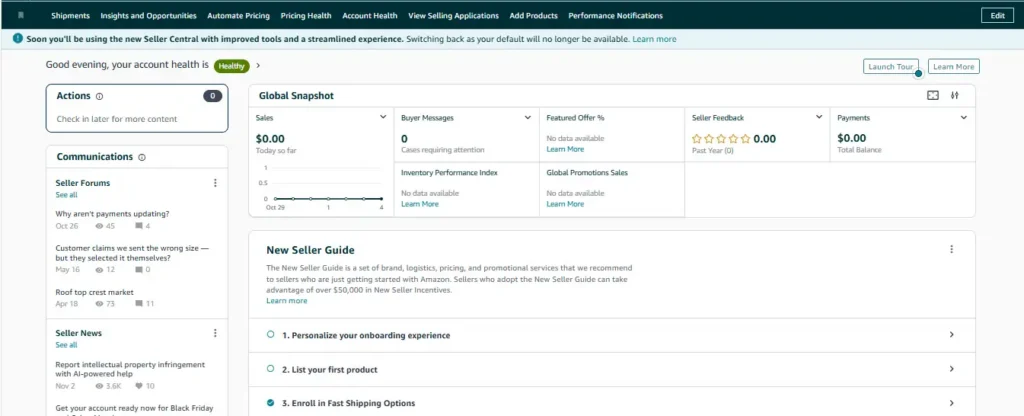
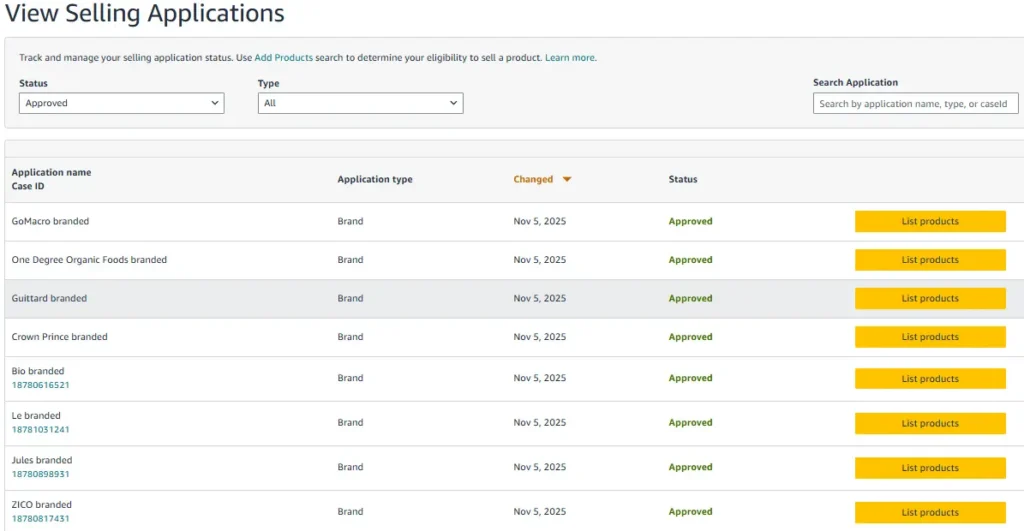
2. Building the Foundation – Brand & Product Ungating: With access to a catalog containing thousands of products across multiple brands, we began securing brand and product approvals. Since the account had no previous sales history, initial applications faced strict reviews. Through continuous applications and a focused ungating strategy, we gradually secured approvals for multiple brands and products.
3. First Product Selection & Investment: Based on product research, market analysis, and profitability calculations, we shortlisted suitable products and placed the client’s first Purchase Order (PO).
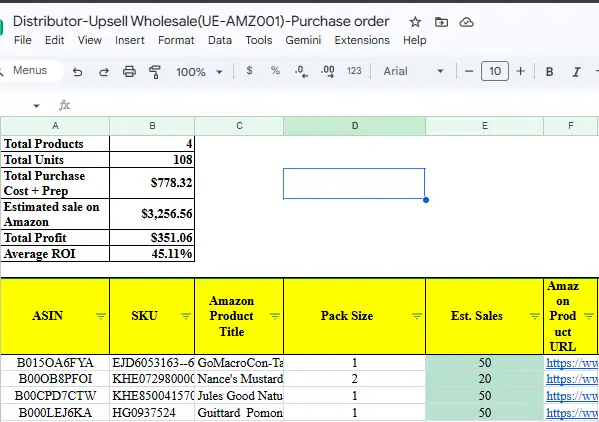
| Estimated Sales | Inventory Purchased | Total Products | Purchase Cost | Average ROI |
|---|---|---|---|---|
| $3,256.56 | 108 units | 4 products | $778.32 (+prep) | 45.11% ROI |
- Milestone: First purchase order successfully placed on behalf of the client ($351.06 total profit).
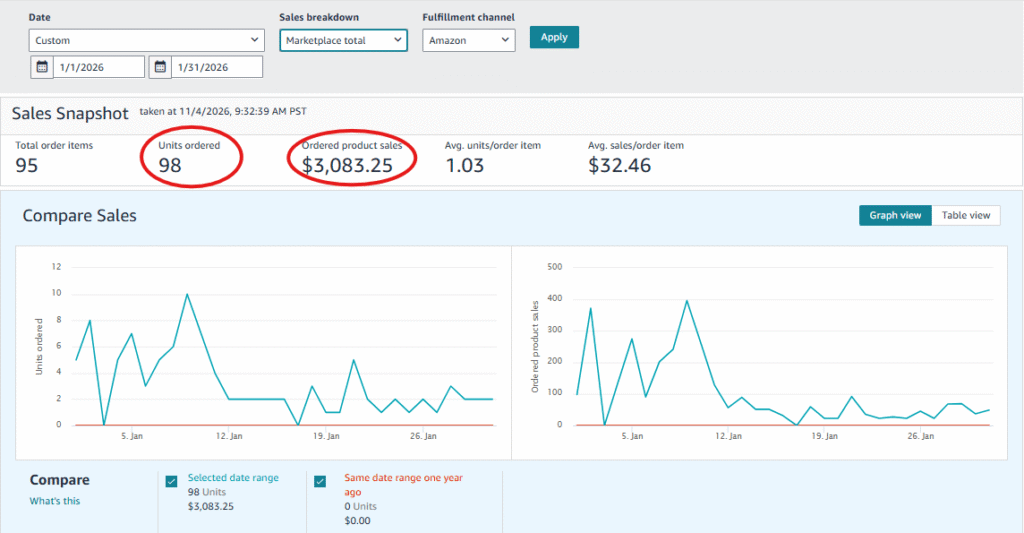
4. First Sales Milestone – Turning Research into Results: After inventory was received at Amazon fulfillment centers, sales began. Within approximately one month, the account achieved sales close to our initial projection ($3,083.25 achieved vs. $3,256.56 projected across 98 units).
Phase 2
Scaling the Business: Strategic Restocking & Expanding Approvals
1. Strategic Product Selection & Restocking: Some initial products experienced natural demand shifts. Rather than repeating identical purchases, we restocked top performers, reassessed market prices, and explored new lines from our distributor catalog.
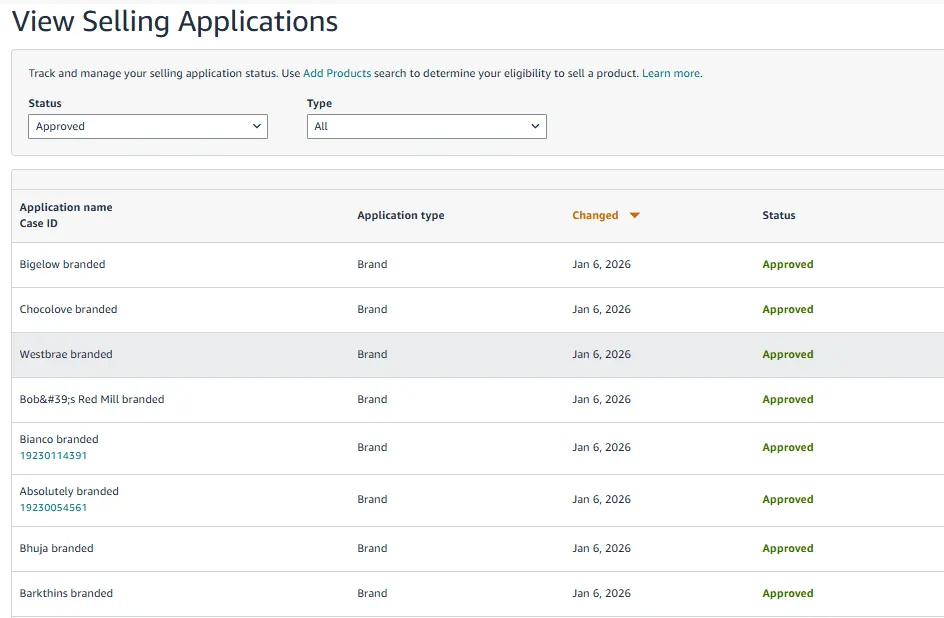
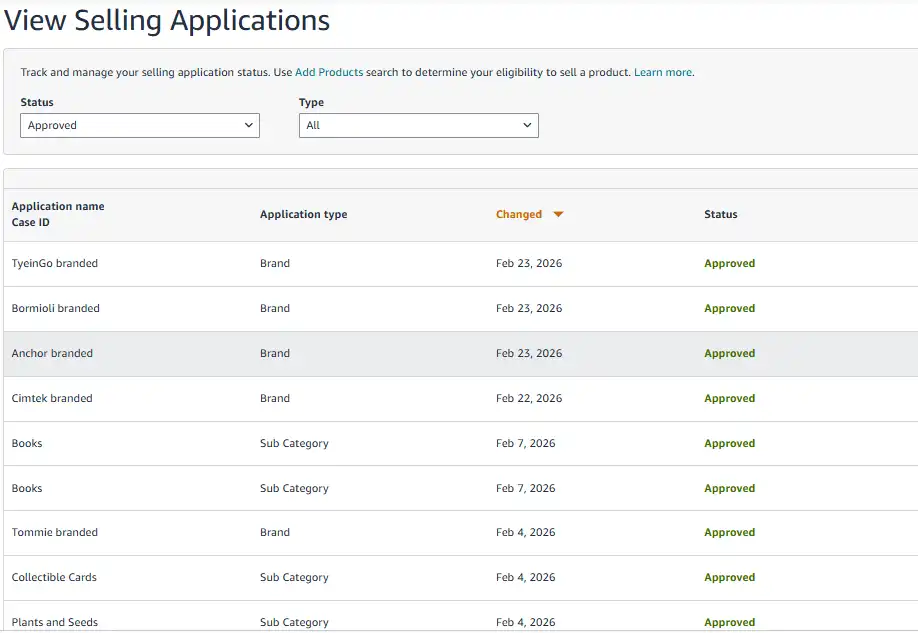
2. Expanding Brand Approvals & Product Opportunities: With sales history established, subsequent brand applications were approved with higher velocity.
3. Second Purchase Order – A Bigger Investment: Evaluating newly approved lines alongside proven performers, we finalized the second purchasing plan.
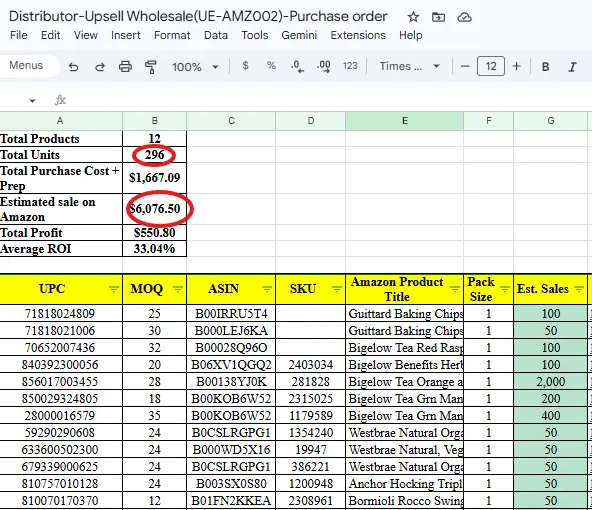
| Estimated Sales | Total Inventory | Total Products | Purchase Cost | Average ROI |
|---|---|---|---|---|
| $6,076.50 | 296 units | 12 products | $1,667.09 (+prep) | 33.04% ROI |
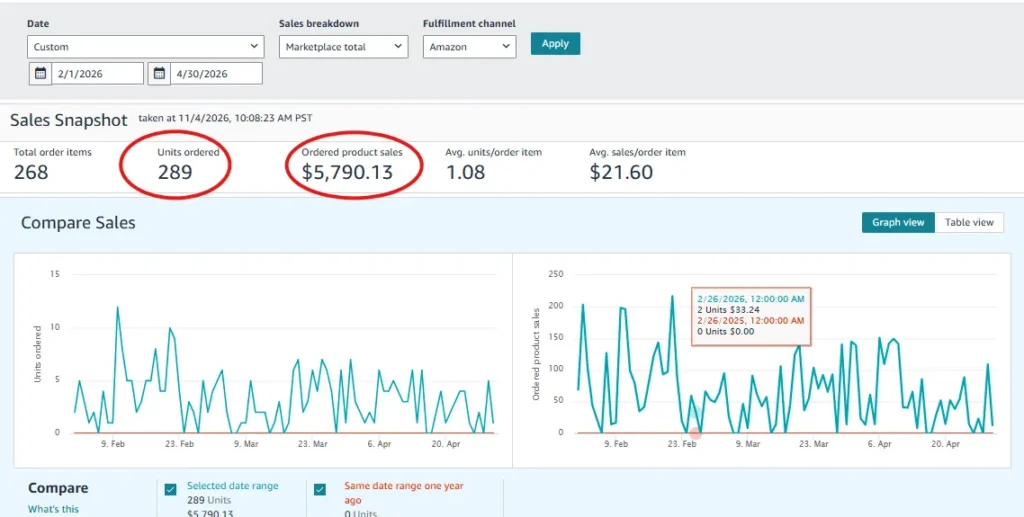
4. Sales Performance – Analysis Meets Results: Over two months of monitoring and automated repricing, the account generated $5,790.13 in actual sales (95.29% of projection) selling 289 units.
Phase 3
Overcoming a Major Challenge: Amazon Supply Chain Verification
1. A Major Verification Challenge: As sales scaled, Amazon initiated a formal Supply Chain Verification review on the account, requiring comprehensive proof of product sourcing and supplier legitimacy.
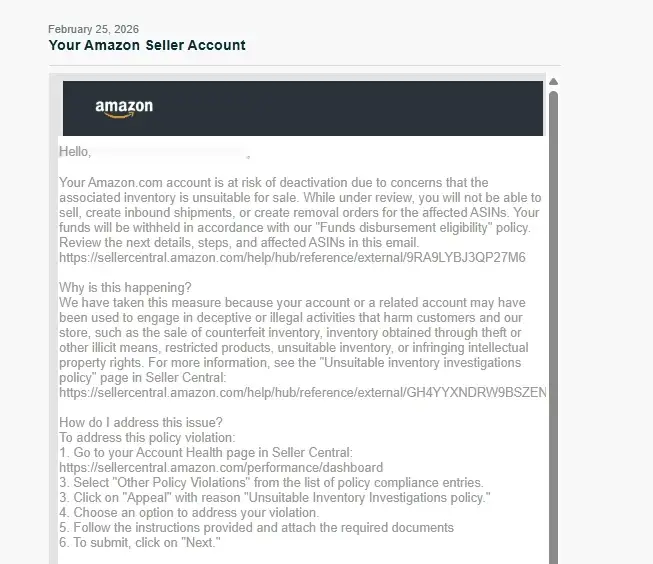
2. Comprehensive Documentation Submission: Upsell Ecommerce coordinated and organized the complete audit package on the client’s behalf:
- Itemized commercial purchase invoices from authorized distributors.
- Brand letters of authorization (LOAs).
- Supplier business registration records and verifiable commercial web presence.
- Bank statements and transaction proof confirming settled payments.
3. Successfully Passing Amazon Supply Chain Verification: Amazon reviewed and accepted the appeal, completely removing all policy flags.
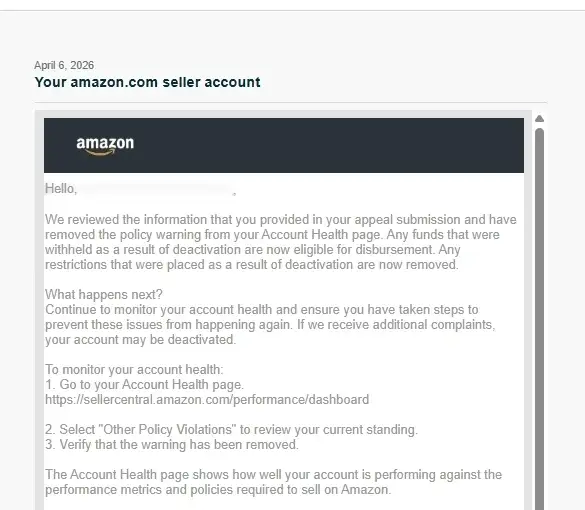
- Verification Successfully Passed: Validates the immense importance of using authorized distributors with transparent invoices.
Phase 4
Accelerating Growth: 100+ Brand Approvals & Consistent $5,000+ Monthly Sales
With verified sourcing credentials, brand ungating accelerated rapidly, surpassing 100+ brand approvals.
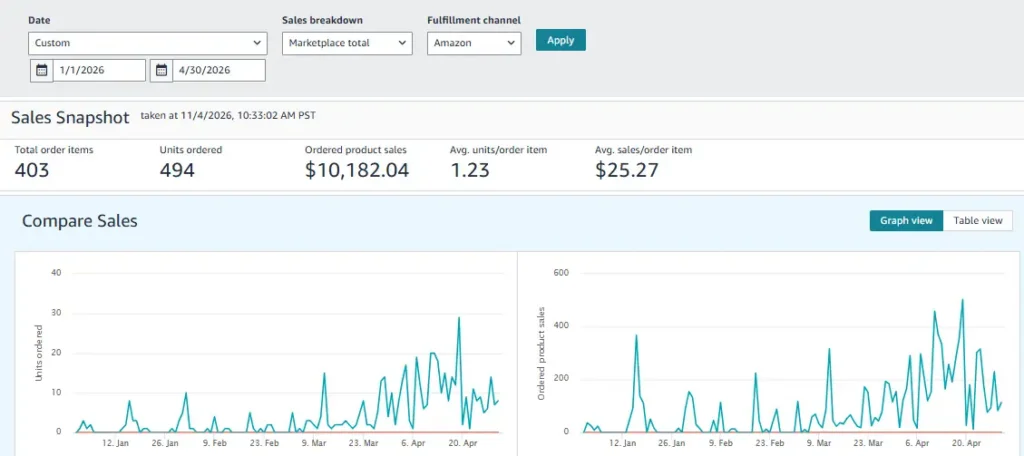
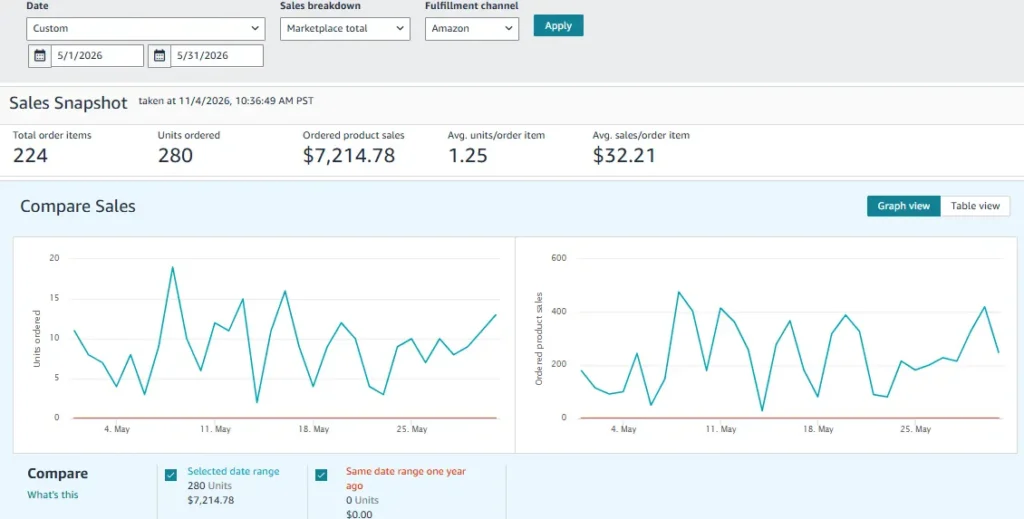
Achieving Consistent $5,000+ Monthly Revenue: Consistent inventory restocks drove revenue above $7,000 in May and exceeded $11,000 in June 2026.
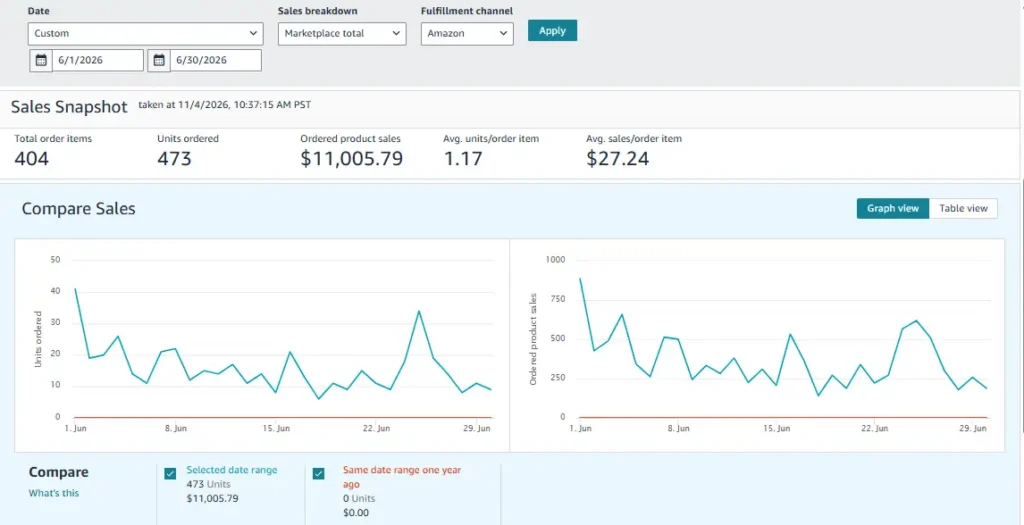
The Journey Continues: Starting from a brand new account with zero approvals and zero sales history, strategic planning and verified sourcing scaled this seller past 100+ brand approvals and five-figure monthly sales.
❌ Common Sourcing Mistakes
Buying from unauthorized sources: A wholesale price does not equal brand authorization.
Believing misleading supplier claims: Always ask for evidence and confirm directly with the brand.
Accepting weak documentation: Invoices must be itemized, accurate, and from genuine commercial transactions.
Placing an oversized first order: Always start small until supplier quality and fulfillment reliability are proven.
Skipping the eligibility check: Always look up the exact ASIN in Seller Central before committing capital.
Choosing on price alone: Factor in referral fees, FBA fulfillment, prep, freight, and returns in your profit math.
Supplier Evaluation Checklist
Use this list before opening an account or placing an order:
- Legal business name and state registration details confirmed.
- Physical commercial address and direct contact details verified.
- Brand authorization confirmed directly with the manufacturer or through official documents.
- Buyer references, reviews, and complaint history reviewed on Trustpilot and industry forums.
- MOQ, wholesale pricing, and volume tiers clearly documented.
- Shipping lead times, damage policies, and payment terms in writing.
- Itemized commercial invoices guaranteed for every completed purchase.
- Target ASIN checked in Seller Central for restrictions and ungating requirements.
- Fees and net margin calculated using realistic pricing, and the first order sized strictly as a test.
Where Upsell Wholesale Fits In
If you would rather not build every supplier relationship from scratch, Upsell Wholesale offers wholesale sourcing services for Amazon sellers. Explore the options to become a customer and compare them against the checklist above. As with any supplier, outcomes such as Amazon approval, account acceptance, or profitability are never guaranteed, so keep running your own checks.
AUTHORISED U.S. DISTRIBUTOR & SPN PARTNER
Scale with Verified Wholesale Inventory:
Direct distributor access, authentic supply-chain documentation, and complete FBA/WFS fulfillment management.
- Authentic brand catalog with verifiable invoices.
- Full FBA & WFS prep, labeling, bundling, and shipping.
- Pre-purchase ungating review and documentation support.
- Automated repricing and dedicated account management.
Final Takeaway
The best authorized wholesale suppliers are found through a process, not a lucky search. Define your goals, prepare your documents, source leads from credible channels, verify authorization yourself, check Amazon eligibility, and prove each supplier with a small order before you scale.
Frequently Asked Questions (FAQs)
Visit the Upsell Wholesale FAQ or contact the team.
